Here's a number worth sitting with: according to Ahrefs' study of roughly 14 billion pages, 96.55% of pages in their index get zero organic traffic from Google. Another 1.94% get between one and ten monthly visits. Not low traffic — zero or almost zero.
Ahrefs also notes that the 14-billion-page sample is relatively small compared with its 340.8-billion-page Site Explorer index and is somewhat biased toward the "quality side of the web." The traffic figures are estimates, too, so the numbers are best treated as directional rather than a literal measurement of the entire web.
That's the entire point of an SEO audit: find the specific things blocking a site before spending another hour changing content, redesigning pages, or guessing at fixes. This guide walks through the audit process the way we'd actually run it — in order, focused on what moves the needle for a small business site, not a 200-item checklist built for enterprise teams with dedicated dev resources.
If you'd rather skip the manual data collection, our AI-powered SEO & Google Business Profile Audit automates much of the technical analysis and delivers prioritized recommendations in minutes.
What an SEO Audit Actually Checks (and Why Small Businesses Skip It)
An SEO audit is a structured review of three layers: whether search engines can find and understand your site (technical), whether your content matches what people are actually searching for (on-page and content), and whether other sites vouch for yours (off-page, mainly backlinks). Google's own SEO Starter Guide frames the goal the same way — this isn't about tricking a ranking algorithm, it's about making a site easy for both users and crawlers to understand.
Small businesses tend to skip this step for one practical reason: there's rarely an obvious symptom pointing to it. A site can look complete — clean design, working pages, decent copy — and still be functionally invisible in search because of two or three technical issues nobody ever checked. A proper audit for a small business owner isn't about producing a 40-page report. It's about isolating the few problems that are actually suppressing traffic, and leaving everything else alone.
The SEO Audit Process (Step by Step)
Run these in order. Technical issues get resolved before content, because polishing copy on a page Google can't index changes nothing.
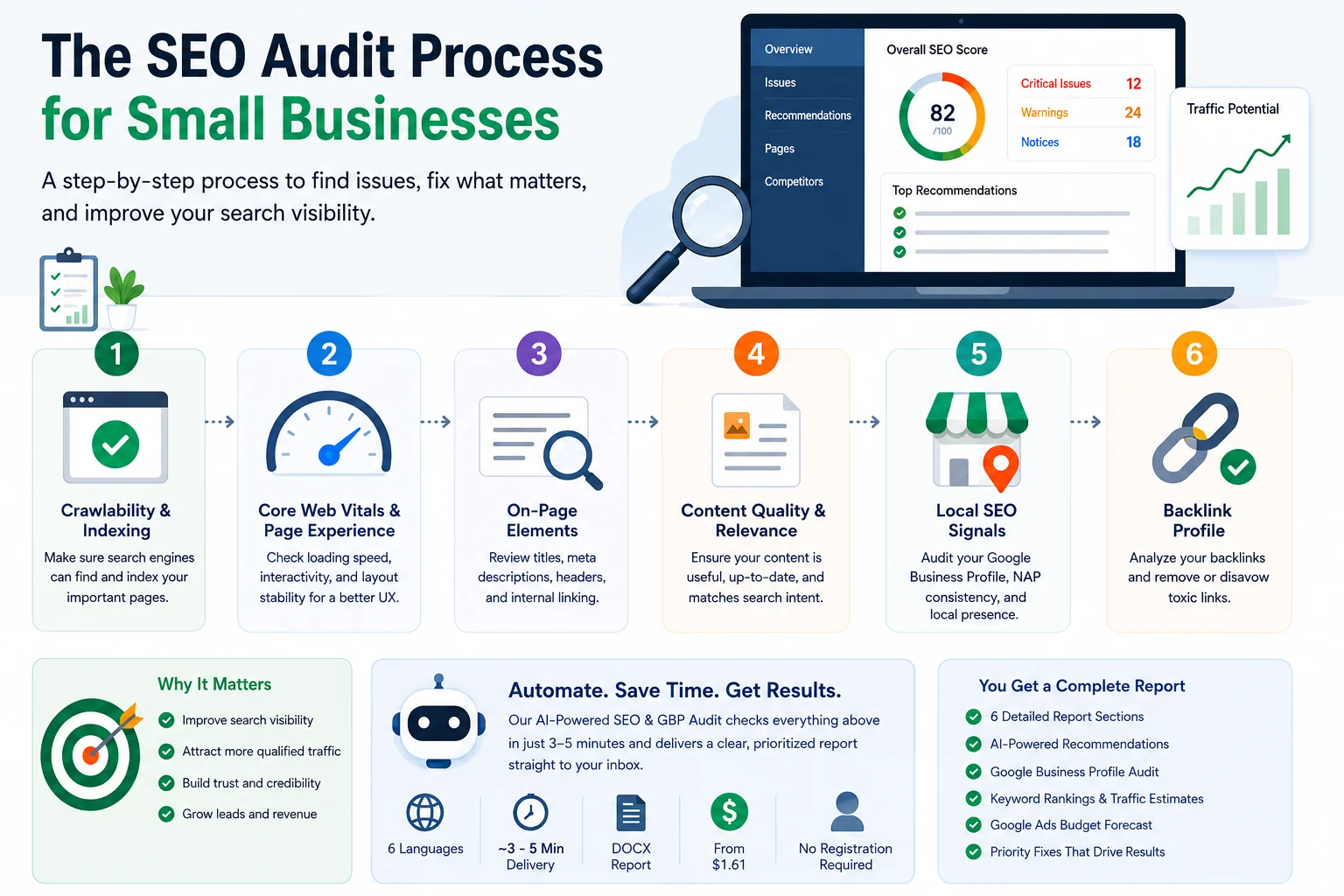
Step 1 — Confirm Crawlability and Indexing
Start in Google Search Console's Pages report. Check which pages are indexed, which are excluded, and why. On small business sites, the usual suspects are a leftover noindex tag from a staging environment, a robots.txt file accidentally blocking key folders, or a sitemap.xml that was never updated after a redesign.
This step carries more weight than it looks like it should. A page with excellent content can still get zero visits if it was never indexed in the first place — Google's Search Essentials documentation spells out exactly what's required for a page to even be eligible to appear in search, and it's worth checking your own site against it line by line rather than assuming everything is fine.
Step 2 — Review Core Web Vitals and Page Experience
Core Web Vitals measure real user experience through three metrics:
LCP (Largest Contentful Paint) — how fast the main content becomes visible.
INP (Interaction to Next Paint) — how quickly the page responds to a click or tap.
CLS (Cumulative Layout Shift) — how much the layout jumps around while loading.
On small business sites, poor scores almost always trace back to the same handful of causes: unoptimized images, too many page-builder plugins stacked on top of each other, or third-party widgets — chat boxes, booking tools — loading before the actual content does. Check these in Search Console's Core Web Vitals report or PageSpeed Insights, and treat any page flagged "poor" as a priority, not a someday task.
If you're auditing multiple websites or simply want everything in one place, an automated audit can combine PageSpeed scores, Core Web Vitals, HTTPS, mobile usability, structured data validation, and crawlability checks into a single report. Instead of switching between several Google tools, you receive one prioritized list of issues ranked by business impact.
Step 3 — Audit On-Page Elements
Go through titles, meta descriptions, and header structure page by page. A title tag should describe what the page is actually about — not repeat a keyword in hopes it triggers a ranking. Meta descriptions don't move rankings directly, but they shape whether someone clicks your result instead of a competitor's, so they still deserve real thought instead of being autogenerated and forgotten.
Check headers (H1, H2, H3) for a logical hierarchy — one clear H1 per page, subheadings that actually reflect the content beneath them. This is also where old keyword-stuffing habits tend to surface: dense, repetitive phrasing that reads awkwardly to a person is usually a sign a page was optimized for a robot instead of a reader.
Check internal linking as well. Important pages should be reachable through relevant internal links, and key service or location pages shouldn't be isolated from the rest of the site. Look for pages with very few internal links pointing to them, broken internal links, and opportunities to connect related content using descriptive anchor text.
Finally, check whether the site uses structured data where it makes sense and whether the existing markup is valid. This isn't a reason to add schema everywhere, but relevant structured data can help search engines better understand certain types of pages and entities.
Step 4 — Evaluate Content Quality and Relevance
For each core page, ask one question: does this genuinely answer what someone searching for it wants to know? Thin pages (a paragraph or two with no real substance), duplicate content spread across near-identical service pages, and outdated information — old pricing, discontinued services, statistics from three years ago — all quietly undercut relevance even when nothing else is technically wrong.
If a competitor's page on the same topic is more thorough and more current than yours, that's usually the real reason they're outranking you. Not a backlink gap. Not a technical glitch. Just a better answer.
Step 5 — Check Local SEO Signals
This is the step that separates a small business audit from a generic one, and it's frequently the highest-impact fix on the whole list. Review:
Google Business Profile accuracy — categories, hours, service areas, photos.
NAP consistency (Name, Address, Phone) across your site, directories, and third-party listings.
Whether you have dedicated landing pages for each service area, if you serve more than one location.
Inconsistent or outdated local information is one of the most common issues on small business sites — and one of the fastest to fix. It directly affects visibility in local search results and map packs, where a large share of small business searches actually happen.
Many businesses also overlook problems inside their Google Business Profile itself. A comprehensive audit should evaluate profile completeness, business categories, review sentiment, missing information, and even compare your GBP against local competitors — areas that often influence local visibility as much as on-page SEO.
Step 6 — Review Backlink Profile
Check who links to your site and how. A small number of relevant, legitimate links generally outweighs a large volume of low-quality or spammy ones — and a toxic backlink profile can actively work against you. Ahrefs' guide to running an SEO audit lays out a sound approach: start with a full site crawl to establish a baseline, then sort referring domains into legitimate versus toxic before deciding what, if anything, needs disavowing.
This closes out the core audit process. At this point, you should have a verified list of technical issues, content improvements, local SEO opportunities, and backlink risks. The next step is to prioritize those findings by business impact rather than treating every warning as equally important.
Turning Audit Results Into a Website Optimization Guide
A list of problems isn't useful on its own. What actually determines results is the order you fix them in. Use a simple filter: impact versus effort.
Fix technical blockers first — indexing issues, crawl errors, broken redirects. Nothing else matters if Google can't reach the page.
Address high-impact content gaps next — thin or outdated pages targeting commercially important terms.
Polish on-page elements — titles, meta descriptions, header structure.
Clean up the backlink profile last — it moves results more slowly than the steps above, and doing it first risks overcorrecting before you understand your baseline.
This order isn't arbitrary — it reflects how much each category actually influences visibility, and it keeps a small team from spending a week rewriting content on a page Google isn't even indexing yet.
The easier it is to prioritize, the more likely improvements actually get implemented. Rather than presenting dozens of disconnected warnings, modern AI-powered audit tools rank recommendations by expected impact, helping small businesses address the fixes most likely to improve search visibility first.
Common Mistakes Small Businesses Make During an Audit
Fixing symptoms instead of causes. Rewriting content on a page with a noindex tag changes nothing — find the root issue first, not the most visible one.
Treating the audit as a one-time task. Sites change, competitors change, and Google's requirements change. A single audit is outdated within months.
Over-optimizing for keywords instead of intent. Repeating a target phrase doesn't help if the page doesn't actually answer the searcher's question.
Ignoring mobile experience. Most local searches happen on mobile; a slow or broken mobile layout erases gains made everywhere else.
Skipping local SEO signals. For a business that depends on nearby customers, an outdated Google Business Profile can outweigh nearly any on-page fix.
SEO Audit Tips for Staying on Top of Site Health
A full audit doesn't need to happen weekly — but monitoring should never stop entirely.
Run a full audit every 6–12 months, or immediately after any major site change: redesign, migration, CMS switch.
Do a lightweight technical check monthly — crawl errors, indexing status, Core Web Vitals scores.
Monitor Search Console continuously instead of waiting for the next scheduled audit. New crawl errors and manual actions are far easier to fix the moment they appear than three months later.
Keep a short log of what was fixed and when, so the next audit measures actual progress instead of starting from zero.
These checks matter less individually than they do together — small, consistent monitoring catches problems while they're still cheap to fix.
From Manual Checklist to Repeatable Process
The process above covers the core checks of a practical SEO audit for a small business site. The difference isn't the basic methodology — it's the amount of manual work involved. Collecting data from Google Search Console, PageSpeed Insights, structured data validators, backlink tools, Google Business Profile, and keyword tracking platforms can easily take several hours before you even begin interpreting the results.
An AI-powered SEO & Google Business Profile Audit streamlines this workflow by combining these checks into a single report. The audit typically takes around 3–5 minutes to generate and includes:
Technical SEO analysis (Core Web Vitals, HTTPS, mobile friendliness, crawlability, structured data).
On-page SEO review (titles, meta descriptions, heading structure, canonical tags, internal linking).
Google Business Profile audit with completeness checks, review sentiment analysis, and competitor comparison.
Organic visibility estimates and keyword position data powered by DataForSEO.
Google Ads budget forecasts with CPC analysis and campaign recommendations.
AI-generated recommendations prioritized by expected SEO impact instead of generic checklists.
Reports are available in six languages, delivered directly to your email in DOCX format, require no registration, and start at just $1.61 per audit. Whether you're auditing your own website or reviewing multiple client sites, the goal stays the same: spend less time gathering data and more time fixing the issues that actually affect rankings.
FAQ
How long does an SEO audit take for a small business site?
For a typical site under 50 pages, a thorough manual audit usually takes 4–8 hours. A dedicated audit tool can shorten the technical crawl significantly, leaving more time for the content and local SEO review that requires human judgment.
Can I do an SEO audit myself, or do I need an agency?
A small business owner can run a solid audit independently using free tools like Google Search Console and PageSpeed Insights, following the process above. An agency becomes more useful for large sites, complex technical fixes, or ongoing management once the fundamentals are already in place.
What's the difference between a technical audit and a content audit?
A technical audit checks whether search engines can crawl, index, and load your site properly. A content audit checks whether the pages themselves are accurate, relevant, and thorough enough to satisfy what people are searching for. Both are part of a complete SEO audit, but technical issues should always be resolved first.
How often should a small business repeat an SEO audit?
Every 6–12 months for a full audit, with lighter monthly checks in between. Any major site change — a new design, a platform migration, a significant content overhaul — is reason enough for an unscheduled audit too.