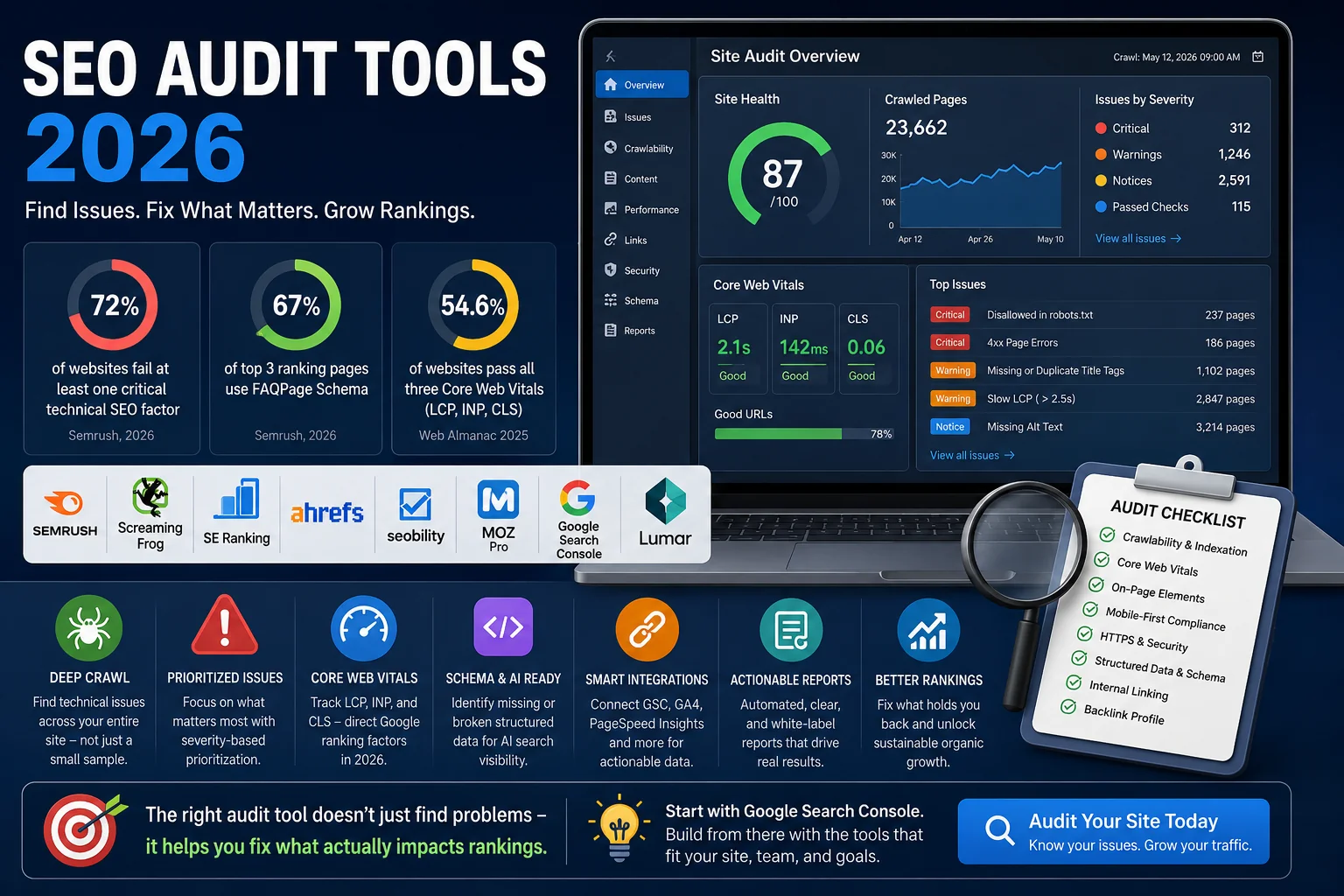
72% of websites fail at least one critical technical SEO factor - and most site owners don't find out until rankings have already dropped. According to Semrush's Website Health Benchmark Report, these failures directly affect how search engines crawl, index, and rank your pages. A single misconfigured robots.txt or a slow-loading page can quietly suppress organic traffic for months before anyone notices.
That's exactly why choosing the right SEO site audit tool matters. A good tool doesn't just surface errors - it tells you which ones actually affect your rankings and what to do about them.
This guide compares the best SEO audit tools 2026 has to offer: from enterprise-grade crawlers to free options built for smaller sites. Whether you're an in-house SEO professional, an agency running audits for clients, or a site owner trying to understand why traffic stalled - you'll find a clear, practical breakdown here.
By the end, you'll know which tools fit your site size, workflow, and budget - and what to look for before committing to any platform.
What Makes a Great SEO Site Audit Tool in 2026?
Not all audit tools are built the same. Some crawl thousands of URLs but bury critical issues in noise. Others have clean dashboards but lack the depth needed for a real technical diagnosis. Before comparing specific platforms, it's worth defining what actually separates a useful tool from one that just looks good in a demo.
Here are the seven criteria used to evaluate every tool in this comparison.
Crawl depth and scale. A tool should handle your site's actual size - not just a sample of it. For large sites, this means crawling hundreds of thousands of URLs per session without throttling or data gaps. For smaller sites, speed and accuracy matter more than raw volume.
Issue prioritization. A list of 847 errors is not an audit - it's noise. The best tools classify issues by severity: critical, warning, and notice. This lets you focus on what's actually hurting rankings rather than chasing low-impact fixes.
Core Web Vitals and INP tracking. Google's performance thresholds in 2026 are concrete: LCP under 2.5 seconds, INP under 200 milliseconds, and CLS under 0.1. Any tool that doesn't surface these metrics - or can't track them over time - is missing a direct ranking signal. According to BrightEdge's research on Core Web Vitals, sites that actively monitor and optimize these metrics see measurable ranking improvements across competitive verticals.
Reporting and white-label options. For agencies managing multiple clients, automated and branded reports are not a nice-to-have. They're a workflow requirement.
AI search readiness. Structured data and schema markup now influence visibility in Google AI Overviews and generative search results. A modern audit tool should flag missing or broken schema and indicate which pages are underoptimized for AI-driven SERPs. Semrush data shows that 67% of pages ranking in positions one through three now carry FAQPage Schema - up from 41% in 2024.
Integrations. Audit data becomes more actionable when connected to Google Search Console, GA4, and PageSpeed Insights. Isolated crawl data tells you what's broken - integrated data tells you what it's costing you in traffic and revenue.
Ease of use vs. depth of data. Some tools are built for technical SEO specialists. Others work better for generalist marketers. The best platforms find a balance: enough depth to be useful, enough clarity to be actionable without a manual.
These criteria are the foundation for everything that follows. Every tool was evaluated against all seven - not just the ones it performs best on.
The 8 Best SEO Audit Tools in 2026 - Compared and Tested
Each tool below was evaluated across the seven criteria above: crawl depth, issue prioritization, Core Web Vitals tracking, reporting, AI search readiness, integrations, and usability. Pricing reflects publicly available plans as of 2026. The goal isn't to pick a single winner - it's to give you enough information to identify which tool fits your specific situation.
Semrush Site Audit
Semrush is one of the most widely used SEO platforms in the industry, and its Site Audit module reflects that maturity. It checks over 140 technical issues across crawlability, on-page elements, performance, and internal linking - and the results sit directly alongside Semrush's keyword, backlink, and competitor data. That integration is what makes it genuinely useful for teams running full-cycle SEO campaigns, not just standalone technical checks.
Best for: In-house SEO teams and agencies that want one platform for audits, keyword research, and competitive analysis.
Pros:
140+ checks covering technical, on-page, and performance issues
Audit data connects directly to keyword tracking and backlink analysis
Clear issue prioritization with thematic reports
Scheduled crawls and automated reporting
Cons:
Entry-level plans limit crawl volume significantly
Can feel overwhelming for users who only need technical audits
Full feature access requires higher-tier plans
Pricing: Starts at $139.95/month. Site Audit is included across all paid plans, with crawl limits varying by tier.
Not a great fit if you're a solo site owner or freelancer who doesn't need the broader Semrush ecosystem - you'd be paying for tools you won't use.
Screaming Frog SEO Spider
Screaming Frog is a desktop-based crawler that has remained a standard tool for technical SEO professionals for over a decade. It identifies 300+ on-site issues and gives you granular control over how crawls are configured - including JavaScript rendering, custom extraction rules, and crawl depth settings. It integrates directly with Google Analytics, Google Search Console, and PageSpeed Insights, letting you cross-reference crawl data with real traffic and performance metrics in a single view.
Best for: Technical SEO specialists and agencies handling large or complex sites that require deep, customizable crawls.
Pros:
300+ technical checks with highly configurable crawl settings
JavaScript rendering support - essential for modern SPAs and dynamic sites
Integrates natively with GSC, GA4, and PageSpeed Insights
Free version available for sites up to 500 URLs
Cons:
Desktop-only - no cloud crawling or team collaboration features
Steep learning curve for non-technical users
No automated scheduling on the free plan; reporting requires manual work
Pricing: Free up to 500 URLs. Paid license at £259/year (~$325) with no crawl limit.
Not a great fit if you need shareable dashboards, automated client reports, or a tool your whole marketing team can use without SEO training.
SE Ranking Website Audit
SE Ranking's audit module covers 115+ technical checks organized by severity - so you can immediately see what's critical versus what's worth fixing later. It covers crawlability, Core Web Vitals, meta tags, HTTPS, and structured data, with results sitting inside SE Ranking's broader platform that includes rank tracking, AI visibility monitoring, and GA4 integration. For agencies that need a reliable audit tool without enterprise pricing, it hits a practical balance between features and cost.
Best for: SEO agencies and mid-size businesses that need solid technical auditing combined with rank tracking and reporting at a competitive price.
Pros:
115+ checks with clear severity classification
Audit data integrates with rank tracking and traffic analytics
White-label reports available on agency plans
Competitive pricing compared to Semrush or Ahrefs
Cons:
Crawl limits on lower plans can be restrictive for large sites
Some advanced checks (log file analysis, JS rendering) are limited
Pricing: Starts at $65/month. Crawl volume and white-label features scale with plan tier.
Ahrefs Site Audit
Ahrefs built its reputation on backlink data, but its Site Audit tool is a serious technical crawler in its own right. It visualizes site structure in a way that makes internal linking and crawl depth issues easy to understand - and it surfaces content-level problems like thin pages, duplicate content, and missing tags alongside traditional technical issues. For teams that already use Ahrefs for keyword research and link building, keeping audits in the same platform is a natural fit.
Best for: Content-driven SEO teams that want technical auditing integrated with keyword and backlink workflows.
Pros:
Strong crawl depth with visual site structure mapping
Surfaces content gaps and on-page issues alongside technical errors
Cloud-based - no desktop installation required
Integrates with Ahrefs' keyword and backlink tools
Cons:
Pricing is high for teams that only need the audit function
Less granular on pure technical issues compared to Screaming Frog
No white-label reporting
Pricing: Starts at $129/month. Site Audit included across paid plans.
Seobility
Seobility is a cloud-based audit tool that checks 300+ factors per page - covering everything from metadata and content quality to duplicate content and internal link structure. It supports recurring scheduled crawls, subdirectory-level auditing, and AI Overview tracking on paid plans, which makes it more suited to ongoing site monitoring than one-off forensic audits. For small to mid-size businesses that need regular visibility into site health without managing a complex tool, it's a practical and affordable choice.
Best for: Small and mid-size businesses that need reliable, ongoing site monitoring without enterprise complexity or pricing.
Pros:
300+ checks per page with clear categorization
Supports recurring crawls and subdirectory-specific audits
AI Overview tracking available on paid plans
Lower pricing than most all-in-one platforms
Cons:
Limited integrations compared to Semrush or Ahrefs
Reporting is functional but less polished than agency-focused tools
Not suited for very large sites with hundreds of thousands of URLs
Pricing: Free plan available with limited crawl volume. Paid plans start at $50/month.
Moz Pro Site Crawl
Moz Pro has long been positioned as an accessible entry point into professional SEO tooling. Its Site Crawl feature covers core technical issues - broken links, redirect chains, missing tags, duplicate content - and pairs them with Moz's Domain Authority metrics and keyword tracking. The interface is one of the cleaner ones in this list, which matters for teams where not everyone has a technical SEO background.
Best for: Marketing teams and SEO newcomers who need actionable audit results without a steep learning curve.
Pros:
Clean, beginner-friendly interface
Combines technical auditing with Domain Authority metrics and keyword data
Weekly crawl scheduling on paid plans
Good educational resources built into the platform
Cons:
Fewer technical checks than Semrush, Ahrefs, or Screaming Frog
Crawl depth is limited on lower plans
Core Web Vitals tracking is less detailed than dedicated tools
Pricing: Starts at $99/month with a 30-day free trial.
Google Search Console (Free)
Google Search Console is not a traditional audit tool - but omitting it from this list would be a mistake. It's the only tool here that shows you exactly what Google sees when it crawls your site. Coverage reports, Core Web Vitals data, index status, manual actions, and crawl errors all come directly from the source. No third-party estimation, no interpretation - just what Google actually recorded.
The 2024 Web Almanac found that 52% of sites use robots.txt files, but many misconfigure them, accidentally blocking key sections. GSC is the fastest way to catch exactly these kinds of issues before they silently suppress your rankings for months.
Best for: Every website at every stage. GSC should be the starting point for any technical audit, regardless of which paid tools you use alongside it.
Pros:
Free with no crawl limits
Direct data from Google: crawl errors, index coverage, Core Web Vitals
Manual action and security issue alerts
Integrates with most paid audit tools
Cons:
Not a replacement for a full technical crawler
Limited historical data (16 months for most reports)
No competitor data, no on-page analysis, no backlink audit
Pricing: Free.
Lumar (formerly DeepCrawl)
Lumar is built for scale. It handles enterprise-level sites with millions of URLs and applies AI-driven analysis to surface patterns that manual review would miss. Beyond crawling, it provides intelligent recommendations and tracks technical health over time - making it less of a point-in-time audit tool and more of an ongoing technical monitoring platform. For large e-commerce sites or enterprise teams managing complex site architectures, it's one of the most capable options available.
Best for: Enterprise SEO teams and large e-commerce sites that need continuous technical monitoring at scale.
Pros:
Handles millions of URLs with enterprise-grade infrastructure
AI-driven insights and prioritized recommendations
Strong visualization of technical issues across site sections
Designed for team collaboration and stakeholder reporting
Cons:
Pricing is not publicly listed - requires a custom quote
Significant overkill for small to mid-size sites
Longer onboarding compared to self-serve tools
Pricing: Custom pricing, aimed at enterprise and agency clients.
SEO Audit Tools Comparison 2026 - Side-by-Side
Choosing between platforms gets easier when the key variables are in one place. The table below consolidates what matters most: whether a free plan exists, what paid access costs, how deep the crawling goes, and which tools are built for agency workflows or AI search visibility.
Tool | Free Plan | Starting Price | Crawl Scale | White-Label | AI/Schema Checks | Best For |
Semrush | No (7-day trial) | $139.95/mo | Up to 1M URLs | Yes (higher tiers) | Yes | All-in-one teams, large projects |
Screaming Frog | Yes (500 URLs) | £259/year | Unlimited (paid) | No | Limited | Technical SEO specialists |
SE Ranking | No (14-day trial) | $65/mo | Up to 250K URLs | Yes | Yes | Agencies, cost-conscious teams |
Ahrefs | Limited (free tools) | $129/mo | Up to 5M URLs | No | Limited | Content + technical SEO teams |
Seobility | Yes (limited) | $50/mo | Up to 25K URLs | No | Yes (paid) | SMBs, ongoing monitoring |
Moz Pro | No (30-day trial) | $99/mo | Up to 500K URLs | No | Limited | Beginners, marketing teams |
Google Search Console | Yes (unlimited) | Free | Google index only | No | No | Starting point for every audit |
Lumar | No | Custom | Enterprise scale | Yes | Yes | Enterprise, large e-commerce |
A few things worth noting before using this table as a decision framework:
Crawl scale numbers reflect plan maximums - actual limits on entry-level plans are often significantly lower. Always check what the starting tier includes, not just what the platform is technically capable of.
White-label matters only if you're delivering reports to clients. If you're running audits internally, it's not a relevant factor.
AI features here refer to structured data checks, schema validation, and visibility signals relevant to AI Overviews - not AI-generated summaries or chatbot interfaces. As of 2026, that distinction matters: schema readiness for generative search is a technical audit function, not a content generation feature.
Google Search Console belongs in every tech stack, regardless of which paid tool you choose. It's the only source of direct Google crawl and index data - and it costs nothing.
SEO Audit Tool (AI-Powered) - Fast Technical & GBP Audits
Alongside traditional SEO platforms, SEO Audit Tool offers a faster and more streamlined approach to website analysis. Instead of requiring setup, crawling configuration, or navigating complex dashboards, the tool works in a very simple way: you enter a website URL and receive a complete SEO audit report delivered to your email within minutes.
What makes it different from traditional SEO suites is its focus on clarity and speed. Rather than overwhelming users with raw crawl data, it automatically structures findings into actionable insights across both technical SEO and business visibility.
The report covers all essential areas of website performance. On the technical side, it evaluates Core Web Vitals, PageSpeed performance, mobile optimization, HTTPS status, crawlability, and structured data. On-page elements such as title tags, meta descriptions, heading structure, canonical tags, and internal linking are also reviewed to highlight issues that directly affect rankings.
In addition to technical SEO, the tool includes a Google Business Profile audit, checking profile completeness, review signals, competitor context, and missing local SEO fields. It also provides an overview of organic visibility, including estimated keyword rankings and traffic insights, along with a Google Ads budget forecast based on CPC data.
One of its key components is the AI-generated recommendations section, which prioritizes fixes based on impact rather than simply listing errors. This makes it easier to understand what actually needs attention first, especially for users who do not want to manually interpret audit data.
SEO Audit Tool operates on a simple pay-per-use model, priced at $1.61 per audit or $32.20 for a 25-audit pack with a discount. There is no registration required, and reports are sent directly via email in DOCX format, making it a lightweight option for quick audits or client previews.
Overall, the tool fits best as a fast diagnostic layer in the SEO workflow - positioned between free tools like Google Search Console and full-scale platforms such as Semrush or Ahrefs. It is particularly useful when the goal is to quickly understand site health and identify the most important issues without investing time in complex setups or ongoing subscriptions.
Website SEO Audit Checklist - What Every Tool Should Cover
A tool is only as useful as the checks it runs. Before committing to any platform, it's worth knowing which audit categories actually affect rankings - and confirming your chosen tool covers all of them.
Here are the eight areas every comprehensive technical audit should address.
Crawlability and Indexation
Check your robots.txt for unintended blocks, verify your XML sitemap is current and submitted to Google Search Console, audit canonical tags for conflicts, and identify pages marked noindex that should be ranking. If search engines can't access a page, nothing else matters. The 2024 Web Almanac data shows that 30% of robots.txt files block CSS assets - a configuration error that directly impacts how pages render and score on Core Web Vitals.
Core Web Vitals
Google measures page experience through three signals: loading speed (LCP), visual stability (CLS), and interactivity (INP). These are direct ranking factors. Your audit tool should surface per-page CWV data, not just site-wide averages. As of late 2025, only 54.6% of websites pass all three metrics simultaneously - meaning nearly half of all sites competing in Google search are failing at least one threshold that directly affects ranking eligibility.
On-Page Technical Elements
Review title tags and meta descriptions for length, duplication, and missing values. Check heading structure (H1-H3) for hierarchy issues. Flag duplicate content across URLs - including pagination and parameter-based duplicates that often go unnoticed for months.
Mobile-First Compliance
Google uses the mobile version of your site as the primary basis for indexing and ranking. An audit should confirm that your mobile pages render correctly, load within acceptable time, and don't hide content that's visible on the desktop.
HTTPS and Security
Security is an explicit Google ranking factor. Every page on your site should load over HTTPS - including internal links, canonical tags, and sitemap URLs. Mixed content warnings, expired SSL certificates, and HTTP redirects are all issues a good audit tool should flag automatically.
Structured Data and Schema
Schema markup increasingly determines how AI-powered search engines - including Google AI Mode and Perplexity - select sources for generated responses. Your audit should validate existing schema, flag implementation errors, and identify page types where markup is missing entirely. This is one of the highest-leverage technical fixes available in 2026.
Internal Linking
Audit crawl depth - how many clicks it takes to reach any given page from the homepage. Check for orphaned pages with no internal links pointing to them, broken internal links, and pages where link equity is being diluted through excessive outbound links.
Backlink Profile
A technical audit isn't complete without reviewing inbound links. Identify toxic or spammy backlinks that could trigger a manual penalty, check anchor text distribution for over-optimization, and confirm that your most important pages are earning links with relevant context.
How to Choose the Right Audit Tool for Your Situation
The comparison table tells you what each tool does. This section tells you which one to actually use - based on your situation, not feature lists.
Answer one question first: who is the audit for, and what happens after you run it?
Solo blogger or small site owner: You need to know what's broken, not manage a crawl infrastructure. Start with Google Search Console - it's free, shows real Google data, and flags the issues that matter most at this scale. Add Seobility's free plan to get page-level technical checks that GSC doesn't cover. Between the two, you have everything a small site needs without paying for tools built for teams ten times your size.
Growing business or in-house SEO team: You're past the basics and need audit data to connect with keyword tracking, content planning, and traffic reporting. SE Ranking gives you solid technical depth at a price that scales with your team. Ahrefs is the better choice if backlink analysis and content gap work are central to your workflow - the Site Audit module fits naturally into that ecosystem.
Agency managing multiple clients: Workflow is the deciding factor. The best audit tools for agencies combine automated scheduling for recurring crawls, white-label PDF reports that can be delivered directly to clients, and API access for pulling audit data into custom dashboards. SE Ranking and Semrush both meet these requirements at different price points - Semrush for agencies that need the full platform, SE Ranking for those prioritizing cost efficiency without sacrificing reporting quality.
One practical note: whatever tool you choose, the audit is only as useful as the process behind it. A scheduled weekly crawl with no one reviewing the results produces the same outcome as no audit at all.
Free vs. Paid SEO Audit Tools - Is Free Enough in 2026?
It depends on what you're trying to diagnose - and how large your site is.
When free tools are sufficient
For small sites under 500 pages, a free stack can cover the essentials. Google Search Console handles index coverage, Core Web Vitals, and crawl errors at no cost. Screaming Frog's free version crawls up to 500 URLs - enough for smaller sites or targeted analysis of specific sections. Seobility's free plan adds on-page checks that GSC doesn't provide. Combined, these three tools address the most common technical issues without any subscription.
When a paid plan becomes necessary
Once your site grows past a few hundred pages, free tools start showing their limits. Crawl caps mean you're auditing a sample, not the full site. Scheduled crawls, trend tracking, and automated alerts - the features that turn audit data into an ongoing workflow - are locked behind paid tiers on every major platform.
For e-commerce sites with large product catalogs, agencies managing multiple client domains, or any site that's gone through a recent migration or redesign, a paid tool isn't optional. The cost of missing a site-wide indexation issue or a broken canonical tag at scale is significantly higher than a monthly subscription.
The practical answer
Start free. Use Google Search Console and Screaming Frog's free tier to establish a baseline. If you're hitting crawl limits, spending more time compiling reports than acting on them, or managing more than one site - that's the signal to move to a paid plan.
Which SEO Audit Tool Wins in 2026?
There's no single best SEO audit tool - there's only the right tool for your site size, team structure, and workflow. After comparing eight platforms across crawl depth, issue prioritization, reporting, and AI search readiness, the pattern is consistent: the tools that deliver the most value are the ones that match how you actually work, not the ones with the longest feature list.
Priority | Best Choice |
Budget | Google Search Console (free) + Seobility free tier |
Features | Semrush for all-in-one teams; SE Ranking for agencies on a budget |
Scale | Screaming Frog for technical depth; Lumar for enterprise volume |
The best tools in this list share one thing: they surface problems clearly and give you a path to fix them. That's the standard any audit tool should meet - and the standard you should hold every platform to before committing.
If you want a fast starting point without configuring a full platform, run your site there and get a clear picture of where things stand today.
FAQ
What is an SEO audit tool?
An SEO audit tool crawls your website and identifies technical issues that prevent search engines from properly accessing, indexing, and ranking your pages - such as broken links, slow load times, missing metadata, and crawl errors.
Which SEO audit tool is best for beginners?
Google Search Console is the best starting point - it's free, directly reflects how Google sees your site, and requires no configuration. Moz Pro is the best paid option for beginners due to its clean interface and guided recommendations.
How often should I run a technical SEO audit?
For most sites, a monthly crawl is sufficient. After a major update - new CMS, site migration, or redesign - run an audit immediately. Large e-commerce sites benefit from weekly automated crawls to catch issues before they compound.
Do SEO audit tools check Core Web Vitals?
Most paid tools surface Core Web Vitals data, but they pull it differently. Semrush, SE Ranking, and Seobility include CWV reports within their audit modules. Google Search Console remains the most accurate source since it uses real Chrome user data, not simulated tests.
What's the difference between Screaming Frog and Semrush Site Audit?
Screaming Frog is a desktop crawler focused on deep technical analysis - ideal for specialists who need full control over crawl settings. Semrush Site Audit is cloud-based and integrates audit data with keyword, traffic, and competitor insights - better suited for full-cycle SEO teams.
Can SEO audit tools help with AI search visibility?
Yes, but specifically through structured data checks. Tools like Semrush, SE Ranking, and Seobility flag missing or broken schema markup - the primary technical signal that influences whether your pages appear in Google AI Overviews and other generative search results.
Is Google Search Console enough for a complete audit?
No. GSC shows you what Google has already indexed and flagged - it doesn't proactively crawl your site for all technical issues. Use it alongside a crawler like Screaming Frog or a platform like SE Ranking for complete coverage.
What should a technical SEO audit always include?
At minimum: crawlability and indexation checks, Core Web Vitals, on-page elements (titles, meta, headings), mobile compliance, HTTPS status, structured data validation, internal link structure, and backlink profile review.